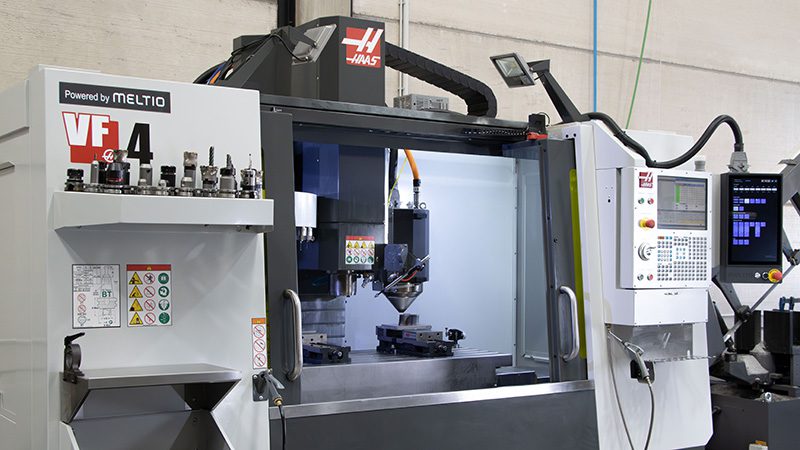
3D printing and machining are often considered competitors, but they can also be effective partners. In fact, 3D printed parts are routinely machined to create higher tolerances and better surface finish. Meanwhile, parts that were once milled from a solid block of metal are often 3D printed far faster and in more complex shapes.
For the engineers and CNC operators reading this, the question isn’t “what is hybrid?”, it’s “how does it fit inside my machine?”
At Meltio, we don’t just talk about hybrid as a theory. We manufacture the hardware that turns existing Haas, Mazak, and other CNC brands into metal 3D printers.
Machine makers say hybrid technology overcomes the shortcomings of both of their parent technologies and enables manufacturers to produce more accurate and higher-quality components faster and at a lower cost. It is less wasteful than machining alone and more productive and precise than 3D printing alone, with no manual labor to move parts around and no programming to connect two distinct pieces of equipment.
This guide covers the technical reality of the Meltio Engine CNC Integration: the hardware, the controls, and the workflow.
TIP: If you’re wondering how Meltio fits in the Machine shop, read this article later.
1. Fitting the printing head into the CNC
The primary challenge in retrofitting a CNC machine is space. A Vertical Machining Center (VMC) is a hostile, crowded environment. You have a spindle moving at high RPMs, an Automatic Tool Changer (ATC) swinging arms around, and tight clearance on the Z-axis. You cannot permanently mount a 3D print head next to the spindle; it would collide with the workpiece during deep milling operations or interfere with the tool changer.
The solution: The Retract System
We solved this with a dedicated hardware deployment mechanism. The Meltio deposition head is not mounted inside the spindle (which would require manual swapping). Instead, it is mounted on the side of the spindle casting using a custom bracket.
The system operates in two states:
The Unretracted (Active) state: When printing, the head deploys pneumatically or electrically to a precise, repeatable position. It extends below the spindle nose, becoming the lowest point of the Z-axis assembly. This allows the laser to focus on the substrate without the milling tool interfering.
The Retracted (Parking) state: When the printing cycle finishes, the head automatically retracts upwards and locks into a “Parking Box.”
Clearance: This moves the head significantly above the tool tip, ensuring full freedom of movement for standard milling.
Protection: The parking box seals the sensitive optics away from the machining environment. When you turn on high-pressure flood coolant to mill the part, the print head is safe, dry, and out of the way.
2. The control logic: How the CNC talks to the head
You do not need to replace your CNC controller or learn a proprietary 3D printing OS. The Meltio Engine is designed to act as a “servant” to your CNC’s “master” controller. We utilize the standard protocols your machine already has: Digital I/O and Analog Signals.
The communication loop
The integration typically requires installing an electrical cabinet (the Meltio Engine Controller) next to your machine. Here is how the handshake works:
Activation (M-Codes): We assign unused M-codes in your CNC controller (e.g., M80 for Laser On, M81 for Laser Off). When your G-code program reads M80, the CNC sends a 24V signal to the Meltio controller to ignite the lasers.
Process Control (Analog 0-10V): How do you control the laser power? The CNC sends an analog voltage signal
Safety Interlocks: The system is wired into the CNC’s emergency stop loop. If the CNC errors out, the laser cuts immediately. If the laser overheats, the CNC enters a feed hold.
The HMI (Human Machine Interface)
While the CNC controls the motion, the operator needs to monitor the print parameters (temperature, laser status, and wire jams). We provide a dedicated Meltio HMI tablet that mounts next to your standard CNC screen. This gives the operator a comprehensive dashboard of the additive process without cluttering the Fanuc/Siemens interface.
3. The CAM workflow: Programming a Hybrid part
The hardware is installed. Now, how do you program it? You don’t want to hand-code millions of lines of G-code.
Since the CNC sees the Meltio head as just “another tool,” the workflow integrates into your existing CAM software.
Slicing / Path Generation: You can use plugins for Mastercam, Siemens NX, and ESPRIT. These post-processors are crucial. They take your 3D model and generate the toolpaths, automatically inserting the correct M-codes for laser on/off and the specific feed rates for metal deposition.
Merging the code: The output is a standard .nc or .tap file. You can run this as a standalone program or merge it with your subtraction program.
Simulation: Using the CAD model of the retracted and unretracted head, you can simulate the full cycle in your CAM software to check for collisions before sending it to the machine.
4. The environment: Why Wire-Laser works in a Machine Shop
Technicians often ask: “Can I really run a laser welder inside a dirty, wet CNC machine?”
If we were using powder-based technology (LMD/SLM), the answer would likely be no. Powder is a contaminant; it destroys linear guides, clogs coolant filters, and creates explosion hazards.
No loose powder. Just safe and clean wire feedstock.
Coolant compatible
You can run your flood coolant immediately after printing. The deposited part is fully dense metal.
Chip management
Standard chip conveyors work fine. You don't need a separate vacuum room.
The W-LMD technology produces parts with exceptional microstructure and a density of 99.998%, surpassing the properties of castings and rivaling those of forgings.
5. How does a typical cycle look?
Setup: Clamp your base plate
Print: The head deploys. The machine runs the additive G-code
Retract: The head parks safely
Machine: The tool changer swaps to a face mill. You face the part to tolerance
Finish: You have a finished, high-precision part without ever moving the fixture
6. Ready for the next step?
The goal of this integration isn’t just to “add 3D printing.” It is to achieve Single Setup Manufacturing.
Q: Can I retrofit any CNC machine?
A: Most 3-axis, 4-axis, and 5-axis vertical machining centers can be retrofitted. The main requirement is physical clearance for the retracted head on the Z-axis.
To provide the best possible experience, we use technologies such as cookies to store and/or access information on your device. Your consent to these technologies will allow us to process data such as your browsing behavior or unique identifiers on this site. If you do not consent or withdraw your consent, certain features and functions may be affected.
Funcional
Always active
El almacenamiento o acceso técnico es estrictamente necesario para el propósito legítimo de permitir el uso de un servicio específico explícitamente solicitado por el abonado o usuario, o con el único propósito de llevar a cabo la transmisión de una comunicación a través de una red de comunicaciones electrónicas.
Preferencias
El almacenamiento o acceso técnico es necesario para la finalidad legítima de almacenar preferencias no solicitadas por el abonado o usuario.
Estadísticas
El almacenamiento o acceso técnico que es utilizado exclusivamente con fines estadísticos.El almacenamiento o acceso técnico que se utiliza exclusivamente con fines estadísticos anónimos. Sin un requerimiento, el cumplimiento voluntario por parte de tu proveedor de servicios de Internet, o los registros adicionales de un tercero, la información almacenada o recuperada sólo para este propósito no se puede utilizar para identificarte.
Marketing
El almacenamiento o acceso técnico es necesario para crear perfiles de usuario para enviar publicidad, o para rastrear al usuario en una web o en varias web con fines de marketing similares.